Norton AntiVirus Plus: what the entry-level plan really protects
Advertising disclosure
This article contains partner links. If you buy a subscription after following one, DALAMIS s.r.o. receives a commission from the seller. The price you pay is unchanged, and the commission does not influence our conclusions — including the sections below that tell you when not to buy.
We are not Norton. orviden.online is an independent publication with no commercial relationship to Gen Digital Inc. beyond the affiliate programme described in our editorial policy.
Norton AntiVirus Plus is Norton's cheapest paid plan. It is a genuinely capable product, and it is also the plan most often mis-sold — usually by pages that credit it with a VPN and dark-web monitoring it does not contain. This is what it includes, what the laboratories measured in 2026, and how to work out whether you need any of it.
What Norton AntiVirus Plus actually is
Norton AntiVirus Plus sits at the bottom of Norton's consumer range. Above it are Norton 360 Standard, Norton 360 Deluxe and the larger family and identity plans. All of them share the same detection engine; what changes between the tiers is how many devices are covered and how many extra services are bundled alongside the antivirus.
That is the single most important thing to understand before you buy. The engine you get in the cheapest plan is the same engine the laboratories test in the expensive one. What you are paying more for, higher up the range, is a VPN, dark-web monitoring, parental controls and a larger cloud backup allowance — not better malware detection.
What we checked
The feature list in this article was read from Norton's own product page on 25 September 2026. Norton changes plan contents, device counts and storage allowances by country and by promotion, and it does so without notice. Where Norton's own page differs from this one, Norton's page is correct. Tell us at info@orviden.online and we will fix it.
What actually gets ordinary people
The threats that reach home users are rarely sophisticated. They are industrialised and cheap: stolen credentials bought in bulk, phishing kits rented by the month, and malware families sold as a service to people who could not write one themselves. The attacker's advantage is not technical brilliance. It is volume.
In practice, three patterns account for most consumer incidents:
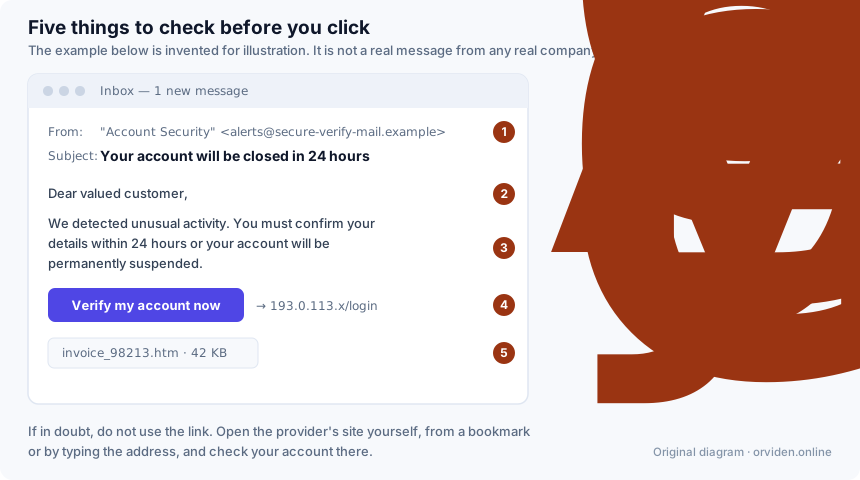
- Credential phishing. A message that imitates a bank, a delivery company, a tax office or a streaming service, and asks you to "confirm" a login. The page that receives your password looks right because it was copied from the real one.
- Information stealers. A program bundled into a cracked game, a fake installer or a "codec" download, which quietly copies saved browser passwords, session cookies and cryptocurrency wallet files and sends them away.
- Ransomware. Less common against individuals than against companies, but far more destructive when it lands: family photographs and work documents encrypted, with a payment demand attached.
Antivirus software addresses all three, but not equally. It is strong against stealers and ransomware, which are files it can inspect. It is weaker against credential phishing, where nothing malicious is ever downloaded — you simply type your password into the wrong box. That is why the web-filtering layer and your own habits matter as much as the scanner does.
How a security engine reaches a verdict
"Antivirus" is a historical name. A modern engine does not simply compare files against a list of known viruses; that approach stopped being sufficient roughly two decades ago, when attackers began generating a fresh variant of their malware for every victim. Four methods now run alongside each other.
Signature matching is still there, and still useful: it is fast, cheap and certain for anything already catalogued. Static heuristics examine a file's structure without running it, looking for the packing, obfuscation and unusual permission requests that legitimate software rarely needs. Behavioural monitoring watches what a program does once it runs — a process that begins rewriting thousands of documents in sequence is doing something no word processor does. Cloud reputation asks the vendor's network how widely a file has been seen and for how long; a binary that exists on four machines worldwide and was compiled this morning is treated with more suspicion than one installed by millions of people for years.
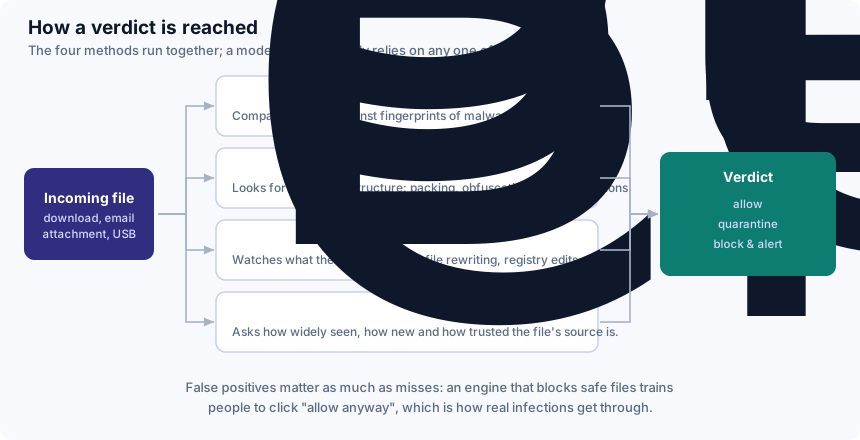
There is a trade-off buried in this that vendors rarely advertise. Tuning an engine to be more aggressive raises its detection rate and also raises its false positive rate — the number of safe files it blocks by mistake. That matters more than it sounds. A product that regularly quarantines your accounting software teaches you to click "allow anyway" without reading, and that habit is precisely what a real infection needs. When you read laboratory results, read the false-positive column with the same attention as the protection column.
See Norton AntiVirus Plus on the seller's site
Prices, editions and the current promotion are shown on the seller's own page — we do not reproduce them here because they change constantly and vary by country.
Check the current offerPartner link · commercialThe button above is a partner link. If you buy after following it, DALAMIS s.r.o. earns a commission from the seller. You pay the same price either way, and we receive nothing for writing favourably.
Why a suite is built in layers
No single control catches everything. The design principle behind every security suite, consumer or corporate, is that a failure in one layer should be caught by the next. A malicious link that gets past the mail filter may be blocked by the web filter; a file that the web filter allows may be caught by the scanner; a program the scanner clears may still be stopped by behavioural monitoring once it starts acting badly.
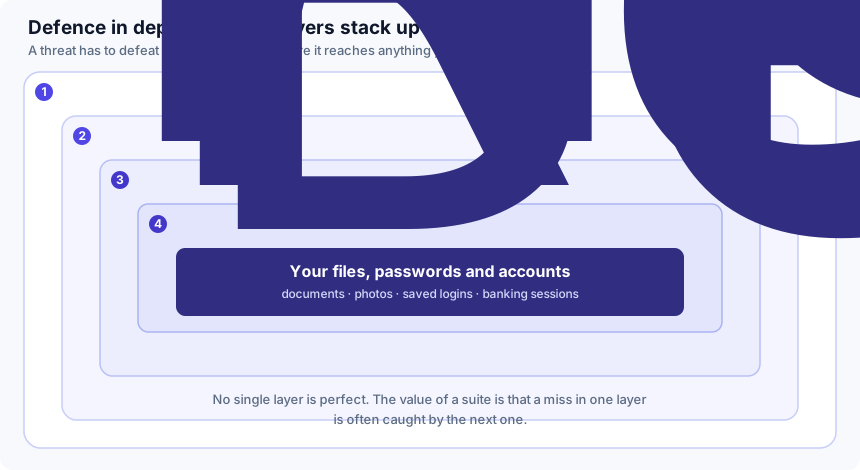
This is also the honest answer to "is antivirus still necessary?" The layers are real and they do work, but none of them is a guarantee, and no vendor that tells you otherwise should be believed. The outermost layer is still you — the person deciding whether to open the attachment.
What is in the plan — and what is not
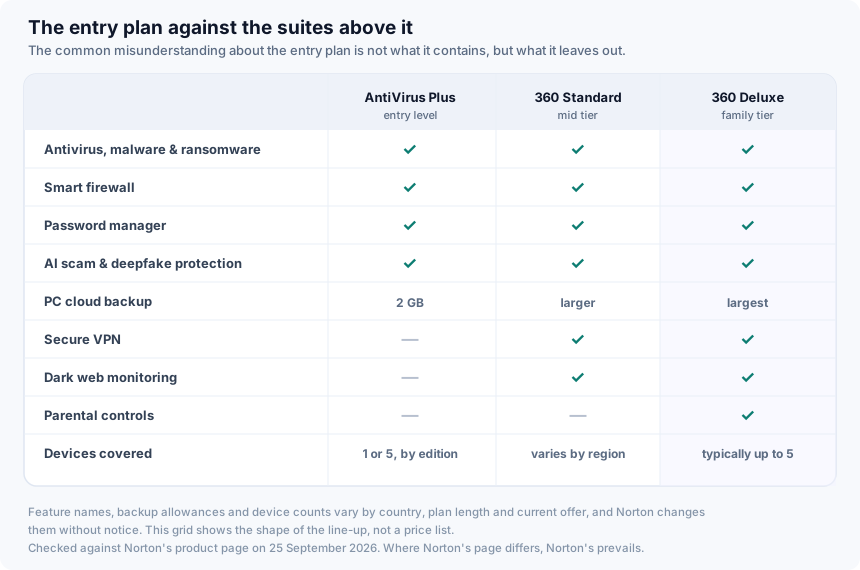
According to Norton's product page as read on 25 September 2026, Norton AntiVirus Plus includes protection against malware, ransomware and hacking; a smart firewall; Norton's password manager; 2 GB of PC cloud backup; and Norton's AI-based scam-protection and deepfake-protection features. It is sold in a one-device edition and a five-device edition, and Norton lists Windows, macOS, Android and iOS among the supported systems — though several individual features, cloud backup among them, are Windows-only.
What it does not include is as important:
- No Secure VPN. Norton's VPN is part of the Norton 360 plans, not AntiVirus Plus.
- No dark-web monitoring. Likewise a Norton 360 feature.
- No parental controls. These appear only in Norton 360 Deluxe and above.
If a page tells you that the entry plan bundles a VPN and breach monitoring, that page has not checked. An earlier version of this article made exactly that mistake; see the corrections note at the end.
The short version
- The detection engine is the same across the Norton consumer range. The cheap plan is not a weaker scanner.
- AntiVirus Plus leaves out the VPN, dark-web monitoring and parental controls.
- Independent laboratories rate Norton's engine at the top level — alongside several competitors, not alone.
- Buy it for the engine and the firewall. If you want the VPN, you are looking at the wrong plan.
Ransomware: where it can still be stopped
Ransomware is worth treating separately because it is the one category where the outcome is binary. A stealer that is caught late still cost you some passwords you can change. Ransomware that is caught late has already rewritten your files.
An attack runs through recognisable stages, and a security suite has something to offer at each of the first four. Once encryption has completed, no scanner helps: recovery depends on whether you hold a copy of the data that the malware could not reach.
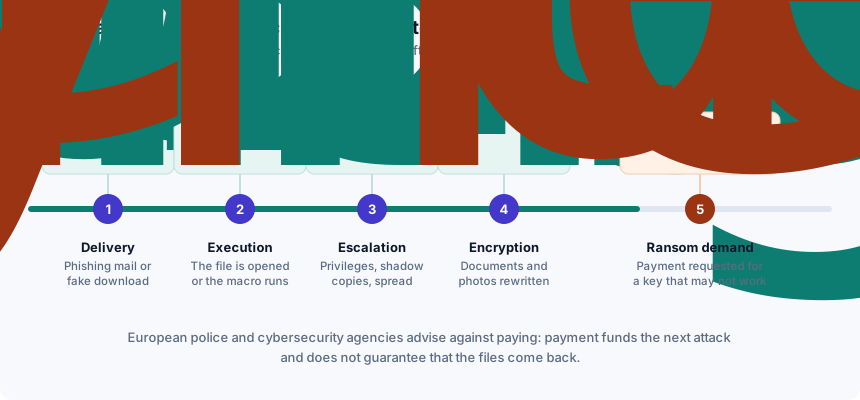
This leads to the least commercial advice in this article: the single most effective thing you can do about ransomware costs nothing and has no brand name. Keep a copy of your irreplaceable files on a drive that is physically disconnected when you are not using it. A synced cloud folder is not a backup — ransomware encrypts the local copy and the sync dutifully propagates the damage. Software reduces the chance of reaching that point. A backup decides what happens if you do. Our ransomware guide goes through this in more detail.
What the independent laboratories measured
Vendor marketing is not evidence. Independent laboratories are, within limits, and there are three worth reading: AV-TEST in Germany, AV-Comparatives in Austria and SE Labs in the United Kingdom. Each publishes its methodology, each tests on a schedule, and each can be read directly rather than through a vendor's summary of it.
Two recent results, both checked on 25 September 2026:
| Laboratory | Test and period | Result for Norton | What it means |
|---|---|---|---|
| AV-TEST | Home user Windows 11, June 2026 round (Norton 360, versions 26.4 and 26.5) | 6 / 6 protection, 6 / 6 performance, 6 / 6 usability — 18 points, "Top Product" | A perfect card in that round: top protection with no measurable penalty for speed or false alarms. |
| AV-Comparatives | Consumer Real-World Protection Test, February–May 2026, 400 test cases across 20 products | ADVANCED+, the highest award level | Top tier — shared in that round with Avast, AVG, Bitdefender, Kaspersky, Microsoft and TotalAV. |
Read those two rows together and you get an accurate picture, which is less flattering than a marketing page but more useful. Norton's engine performs at the top level. So do several others, including the one Microsoft gives away with Windows. "Top-rated" is true of Norton; "best" is a claim no current published test supports, and we are not going to make it.
Two caveats you should carry into any review you read, ours included. First, the laboratories test Norton 360, not AntiVirus Plus by name — the engine is shared, but the tested product is not literally the product on sale here. Second, a result describes one round. Rankings move between rounds, and a product that led in June may not lead in December. Check the current AV-TEST table and the current AV-Comparatives results yourself before you spend money.
Compare the plan against the laboratory results
If the engine is what you are buying, this is the cheapest Norton plan that contains it. Check the edition and the renewal price before you commit.
View Norton AntiVirus PlusPartner link · commercialThe button above is a partner link. If you buy after following it, DALAMIS s.r.o. earns a commission from the seller. You pay the same price either way, and we receive nothing for writing favourably.
System impact, honestly
The old complaint about antivirus software — that it makes the computer crawl — is much less true than it was, and we are not going to quote a benchmark we did not run. What we can tell you is where the honest numbers live: AV-TEST's performance score, which is the third of the three 6-point categories in the table above, and AV-Comparatives' separate Performance Test, which measures file copying, archiving, application launching and web browsing on a standard machine.
In the June 2026 AV-TEST round, Norton scored the full 6 points for performance. That is a measured result on the laboratory's reference hardware, not a promise about yours. Your own experience will depend on your processor, whether you are on a mechanical disk or an SSD, and how much memory you have; the difference between a modern laptop and a ten-year-old desktop is far larger than the difference between two competing antivirus products.
One practical note that applies whatever you buy: run only one real-time scanner. Two products monitoring the same file operations will slow the machine and can interfere with each other. On Windows, installing a third-party suite normally causes Microsoft Defender to step back automatically, which is the behaviour you want.
Price, renewal and your refund rights
We do not publish prices, because they change constantly, vary by country and depend on whatever promotion is running on the day you look. Check the price on the seller's own page. Three things about the commercial terms are worth knowing before you click.
The first year is not the ongoing price. Consumer security software is sold on a deep first-year discount that ends at the first renewal. Find the renewal price before you buy, not a year later, and note where in your account auto-renewal can be switched off.
Norton advertises a 60-day money-back guarantee on its annual subscriptions, and a "Virus Protection Promise" under which, if a Norton expert cannot remove a virus from your device, you get your money back. Norton states that the promise requires an automatically renewing subscription for a product with antivirus features. Read the current conditions at the point of purchase — a guarantee is only as good as the terms attached to it on the day you buy.
You also have statutory rights. If you are a consumer in the European Union buying at a distance, EU consumer law gives you a right of withdrawal, normally 14 days, separate from and additional to any commercial guarantee the seller chooses to offer. For downloadable software, the trader may ask you to agree that supply begins immediately, which can affect that right; read what you are agreeing to at checkout. This paragraph is general information, not legal advice.
Who it suits, and who should look elsewhere
It suits you if you want a strong, well-tested engine with a firewall and a password manager for one or a few machines; you prefer a single vendor's paid product with a support line behind it; or you have been running an expired trial for months, which is the worst of all configurations because it looks like protection and is not.
Look elsewhere if you mainly want the VPN — that is a Norton 360 plan, or a standalone VPN, not this one. Look elsewhere too if you already pay for a password manager and cloud storage, because you would be buying them twice. And if your needs are genuinely basic, if you keep Windows updated, and if you are disciplined about what you download, the free option described in the next section may be enough.
A note on households with children: parental controls are not in this plan. If that is the feature you are shopping for, AntiVirus Plus will disappoint you regardless of how good its scanner is.
The free options, including the one already on your PC
An advertising-funded page has an obvious incentive not to write this section. We are writing it anyway, because leaving it out would make the article misleading.
Microsoft Defender is built into Windows, costs nothing, requires no installation and is tested by the same laboratories as everything else — in the AV-Comparatives Real-World Protection round cited above, Microsoft was among the products awarded ADVANCED+. For a careful user on an up-to-date Windows machine it is a legitimate baseline rather than a consolation prize.
What a paid suite adds over it is mostly consolidation and support: one firewall interface, a password manager, cloud backup, a vendor to call, and — higher up the range — a VPN and monitoring services. Whether that bundle is worth its renewal price is a question about your circumstances, not about detection rates. If the honest answer for you is no, that is a perfectly good answer.
Be more sceptical about free products from vendors you have not heard of. A security product runs with deep access to your system; "free" software with that level of access has to be funded somehow, and historically some of it has been funded by selling browsing data.
A buyer's checklist that works for any brand
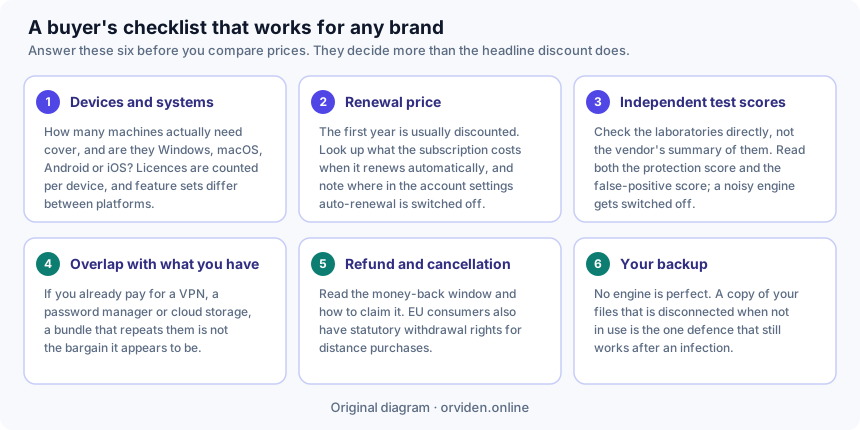
Whatever you end up buying, the same six questions decide whether it was a good purchase. They are worth more than any single review, including this one.
Verdict
Norton AntiVirus Plus is a sound entry-level security product built on an engine that independent laboratories currently rate at the highest level. It gives you that engine, a firewall, a password manager, a small cloud-backup allowance and Norton's newer scam- and deepfake-detection features, for one device or five depending on the edition you choose.
It is not the only product at that level, it is not a substitute for a backup, and it is not the plan to buy if what you actually want is a VPN or parental controls. Judged against what it claims to be — the cheapest way into a well-tested paid engine — it holds up. Judged against the marketing that is often written about it, it is smaller than advertised, and you should know that before you pay.
Ready to decide?
Read the checklist above first. If the answers point to this plan, the seller's page has the current price and terms.
Go to the seller's pagePartner link · commercialThe button above is a partner link. If you buy after following it, DALAMIS s.r.o. earns a commission from the seller. You pay the same price either way, and we receive nothing for writing favourably.
Sources and method
This article was written from the vendor's own published product information and from the published results of independent testing laboratories. No part of it is based on a press release, an affiliate network's promotional copy, or a claim we could not attribute. Where we could not verify something, we said so rather than filling the gap.
- Norton — AntiVirus Plus product page (feature list, device editions, money-back guarantee, Virus Protection Promise), consulted 25 September 2026.
- AV-TEST — home user Windows test results (June 2026 round: Norton 360 versions 26.4 and 26.5, 6/6/6, "Top Product"), consulted 25 September 2026.
- AV-Comparatives — Real-World Protection Test (February–May 2026 round: Norton awarded ADVANCED+; 400 test cases across 20 products), consulted 25 September 2026.
Precedence. Product features, prices, device allowances and guarantee terms are set by the seller and change without notice. Norton's own published information prevails over anything written here. Nothing on this page is a contractual commitment by DALAMIS s.r.o., and nothing on it is legal or financial advice.
Trademarks. Norton, Norton AntiVirus Plus and Norton 360 are trademarks of Gen Digital Inc. and its affiliates. Microsoft and Windows are trademarks of Microsoft Corporation. Use of these names here is descriptive. orviden.online is not affiliated with, endorsed by or sponsored by any of them.
Corrections to an earlier version of this page
We publish our corrections rather than quietly editing. An earlier version of this article, published before the rewrite of 25 September 2026, contained the following errors, all of which are fixed above:
- It said the plan "covers up to five devices" as a flat fact. Norton sells both a one-device and a five-device edition; which one you get depends on what you buy.
- It said the plan includes a secure VPN. It does not. The VPN belongs to the Norton 360 tiers.
- It said the plan includes a data breach monitor. It does not. Dark-web monitoring belongs to the Norton 360 tiers.
- It claimed a full system scan "typically completes in under 30 minutes" and that real-time protection "adds only a few percent" to file operations. Neither figure came from a test we ran or could cite. Both have been removed and replaced with the published laboratory performance scores.
- It claimed a top detection rate "in the most recent round of independent lab tests" without naming a laboratory, a round or a score. It now names all three, and notes which competitors achieved the same award.
- It described a protected-folder feature that leaves files in a state "where ransomware cannot encrypt them, even if the malware does get through". That overstates what any such feature can promise. The ransomware section now describes what these controls realistically do.
- The page was framed as a "reader story" and a "reader-submitted" account. It was neither. It is editorial content written by a named author and funded by affiliate commission, and it now says so at the top.
If you find another error, write to info@orviden.online. Our corrections procedure is published in full.