Spotting phishing and scam emails
This is the threat where software helps least and habit helps most — because nothing malicious is ever downloaded. You simply type your password into the wrong box.
Why filters cannot finish the job
A phishing page is, technically, an ordinary web page. It contains no malware for a scanner to find. Web-filtering layers block addresses already reported as fraudulent, which catches a great deal — but a domain registered forty minutes ago has no reputation yet, and by the time it is listed the campaign may already be over.
That is the honest limit. Security software raises the floor. The last check is you.
The five signs
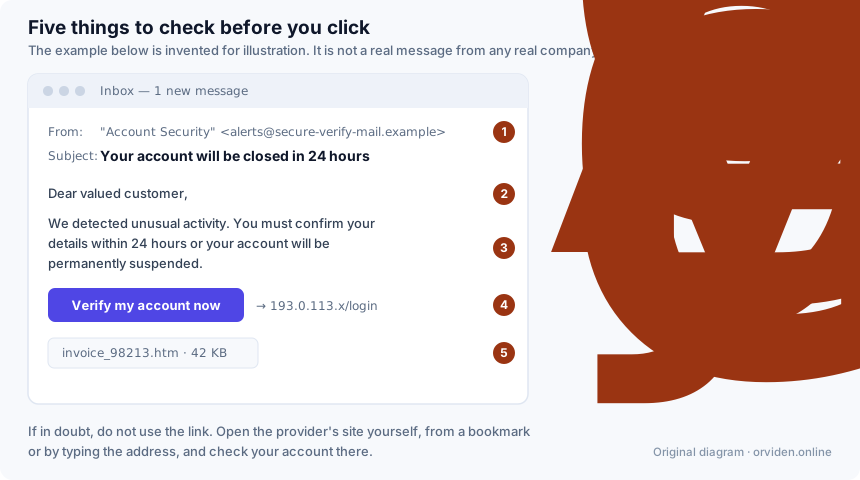
1. The sender domain does not belong to the organisation
Read what comes after the @ symbol, not the display name — the display name is free text and the sender chooses it. Look for domains that merely resemble the real one: an extra word, a hyphen, a different ending, a substituted character. On a phone, tap the sender to expand the full address; the collapsed view shows only the name.
2. A generic greeting
"Dear valued customer" from a company that has your name on file is a signal. It is not conclusive — plenty of legitimate bulk mail is impersonal — but combined with anything else on this list it should stop you.
3. Manufactured urgency
Twenty-four hours to confirm. Your account will be suspended. A payment will be taken unless you cancel now. The deadline exists to prevent you from doing what would expose the fraud: pausing, and checking through a channel you chose yourself. Real organisations do occasionally impose deadlines, but rarely short ones and rarely by email alone.
4. The link does not go where it says
On a computer, hover over the link and read the address in the status bar. On a phone, press and hold to preview it. Watch for a raw IP address, a domain unrelated to the sender, or a lookalike spelling. Shortened links hide the destination entirely, which is reason enough for caution in an unexpected message.
5. An unexpected attachment
Particularly an HTML file (a login page delivered to your inbox, so no suspicious domain appears in the mail), an archive containing a single executable, or a document that asks you to enable macros or editing before it will display. An invoice you were not expecting is not an invoice.
The one habit that replaces all five
Never use the link in the message. If you think it might be real, open the organisation's site yourself — from a bookmark, from your banking app, or by typing the address — and look for the same notice there. If it is genuine, it will be in your account. If it is not, you have lost ten seconds.
Variants worth knowing
- SMS and messaging apps. Same technique, fewer clues: no sender domain to inspect, and shortened links are normal. Parcel-delivery texts are the most common form.
- Telephone calls. Someone claiming to be from your bank or from technical support, asking you to install remote-access software or to move money to a "safe account". No bank does this. Hang up and call back on the number printed on your card.
- Multi-factor fatigue. Repeated approval prompts you did not trigger, in the hope that you approve one to stop the noise. Never approve a prompt you did not cause; it means someone already has your password.
- Search-advertising fraud. A paid advertisement above the real result, pointing at a lookalike site. Check the address bar after you land, before you type anything.
- Synthetic voice and video. A familiar voice on a call, or a video message from a colleague, generated from public recordings. Verify unusual requests — particularly for money — through a channel you initiated.
If you have already entered your password
- Change that password immediately, on the real site, reached without using the link.
- Change it everywhere you reused it. This is the step people skip, and it is the one that matters most, because credential stuffing against other services is the standard follow-up.
- Turn on multi-factor authentication on that account if it is not on already.
- Sign out all active sessions in the account's security settings. A stolen session cookie survives a password change; ending the sessions is what revokes it.
- Check the account's recovery settings — a redirected recovery email address or an added phone number is how an attacker keeps access after you change the password.
- If it was a bank, call the bank on the number from your card, and watch statements for small test transactions.
- If you downloaded or opened anything, run a full scan, and follow the steps in our ransomware guide.
Two habits that make you a hard target
Use a password manager. Not mainly for the strong passwords — for the autofill. A password manager fills credentials by matching the domain, so on a lookalike site it silently does nothing. That refusal to fill is a warning your own eyes can miss.
Prefer phishing-resistant multi-factor authentication. A passkey or a hardware security key is bound to the real site's domain and cannot be handed to a fake one. Codes from an authenticator app are far better than nothing but can still be typed into the wrong page; SMS codes are the weakest of the three.
Related
- How antivirus software works — where web filtering fits in, and where it stops.
- Choosing security software — whether a paid suite is worth it for you.
This guide is general consumer information, not professional security advice. It is written by Sandra Ward for DALAMIS s.r.o. and is funded, like the rest of this site, by affiliate commission earned elsewhere on it — see our editorial policy. Product names mentioned are the trademarks of their owners; where a vendor's own published information differs from this page, the vendor's information prevails.