Choosing security software
The headline discount is the least useful number on the page. These six questions decide whether the purchase makes sense — and they work for any brand.
Start by deciding what you are buying
Every consumer security brand sells roughly the same shape of product range: an entry-level plan containing the detection engine and a firewall, then progressively larger bundles that add a VPN, a password manager, cloud storage, identity or dark-web monitoring and parental controls.
The engine is generally the same across a vendor's range. What changes as you move up is the number of devices and the number of extra services. So the first question is not "which brand", but "which of those extras do I actually need, and am I already paying for them somewhere else?" That question eliminates more bad purchases than any comparison chart.
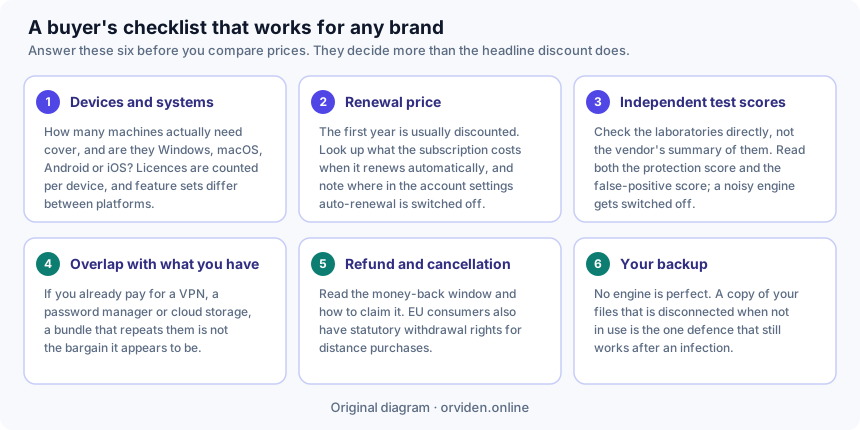
1. Devices and operating systems
Count the machines that genuinely need cover, and note what they run. Licences are counted per device, and feature sets differ by platform far more than the marketing suggests: firewalls, cloud backup, webcam protection and parental controls are frequently Windows-only, while the mobile apps in the same subscription do something quite different from the desktop product.
Buying a five-device plan for two computers is waste. Buying a one-device plan for a household of four is worse, because someone ends up unprotected.
2. The renewal price, not the first-year price
Consumer security software is sold on a steep introductory discount that expires at the first renewal, often at two or three times the price you paid. This is legal and disclosed, and it is also the single most common source of regret in this market.
Before you buy: find the standard renewal price on the seller's own page, and find where auto-renewal is switched off in the account settings. Put a reminder in your calendar a few weeks before the renewal date. If the ongoing price is not one you would choose to pay, do not buy on the strength of the first year.
3. Independent test scores — both columns
Read the laboratories, not the vendor's summary of them: AV-TEST, AV-Comparatives and SE Labs all publish methodology and results in public.
Three things to look for. Check the date of the round you are reading. Check the false-positive result as well as the protection result, because an engine that blocks safe files teaches you to override it. And notice how many products share the top award: in a typical recent round, six or seven well-known products all reach the maximum. That makes "top-rated" a genuine but weak distinction, and makes "the best antivirus" a claim you should treat as marketing wherever you see it — including on sites like this one.
A test result is a snapshot. Rankings move between rounds. A product that led in June may not lead in December, and a single perfect score is much less informative than consistency across several rounds and more than one laboratory.
4. Overlap with what you already pay for
Bundles look like value because the component list is long. Work out what you would actually use:
- VPN. Useful on untrusted networks and for privacy from your network operator. It is not malware protection, and if you already pay for one, a bundled second one is not a saving.
- Password manager. Genuinely valuable — the autofill-by-domain behaviour is real phishing protection. If you already use one, you will not migrate for a bundle.
- Cloud backup. Check the allowance against how much you actually need to protect. A few gigabytes will not cover a photograph library.
- Dark-web or identity monitoring. Tells you a credential has appeared in a breach. Free breach-notification services cover much of the same ground; the paid versions add monitoring breadth and, sometimes, assistance.
- Parental controls. If this is what you need, check it is in the tier you are buying — it usually is not in the entry plan.
5. Refund and cancellation terms
Read the money-back window and how to claim it, including whether it applies to renewals as well as first purchases. Vendors commonly advertise a 30- or 60-day guarantee on annual subscriptions, with conditions attached.
Separately, consumers in the European Union buying at a distance have a statutory right of withdrawal, normally 14 days, which exists independently of whatever commercial guarantee the seller offers. For downloadable software the trader may ask you to agree that supply begins immediately, which can affect that right — so read what you tick at checkout. (General information, not legal advice.)
6. Your backup
The last question is the one no vendor puts on a comparison chart, and it is the most important: do you have a copy of your irreplaceable files on something that is disconnected when you are not using it?
If the answer is no, an external drive will do more for you than upgrading from a good antivirus product to a slightly better one. No engine is perfect; a backup is what determines the outcome when one fails. Our ransomware guide covers this properly.
The short version
- The engine is the same across a vendor's range — you are choosing extras and device counts.
- Find the renewal price before you buy, and know where to switch auto-renewal off.
- Read the laboratories directly; read the false-positive column too.
- Do not buy a second VPN or a second password manager by accident.
- If you have no offline backup, buy a drive before you buy a subscription.
Is free enough?
For a careful user on an up-to-date Windows machine, Microsoft Defender is a legitimate baseline: it is included, it costs nothing, and it is tested alongside the paid products — in AV-Comparatives' February–May 2026 Real-World Protection round it was among those awarded the highest ADVANCED+ rating.
A paid suite buys consolidation, extra services and a support line rather than a fundamentally better scanner. That can be a perfectly good reason to pay. "Free protection is worthless" is not a claim the published evidence supports, and you should be sceptical of any page that tells you otherwise — particularly a page that earns a commission when you buy.
Be more careful with free products from vendors you do not recognise. Security software runs with deep access to your system, and that access has to be paid for somehow.
Related
- How antivirus software works
- Protecting yourself from ransomware
- Our review of Norton AntiVirus Plus — an advertising-funded product page, labelled as such.
This guide is general consumer information, not professional security advice. It is written by Sandra Ward for DALAMIS s.r.o. and is funded, like the rest of this site, by affiliate commission earned elsewhere on it — see our editorial policy. Product names mentioned are the trademarks of their owners; where a vendor's own published information differs from this page, the vendor's information prevails.